JEE Computer Based Exam: Interface, Navigation and Exam-Day Process
Published on November 6, 2026 by Chetna singh
JEE Computer Based Exam: Interface, Navigation and Exam-Day Process
The JEE computer based exam is not new to Indian students anymore but it can still be a cause for concern as many students concentrate on syllabus rather than screen behaviour. JEE Main is a CBT test conducted at designated centres and JEE Advanced is also computer based. We know that every minute counts so here is what you need to know about the interface, the question palette and reporting process.
Is the JEE exam computerized?
Yes JEE Main is a computer based test organized by the National Testing Agency, and JEE Advanced is a computer based test as well. You will be using a given computer on the Exam day to give the paper; you will not be able to use the printed booklet and give the paper from it. The test is not adaptive, not computer based from home and on your device, and not read from printed pages.
What does “computer based” actually mean?
The question paper is shown on a screen and your work will be recorded on screen. You can go back to questions, flag questions, change your mind and answers before clicking to submit your final responses. The computer doesn't assess how you have done your working out but every click you make is recorded - press the navigation buttons carefully.
Inside the JEE computer based interface
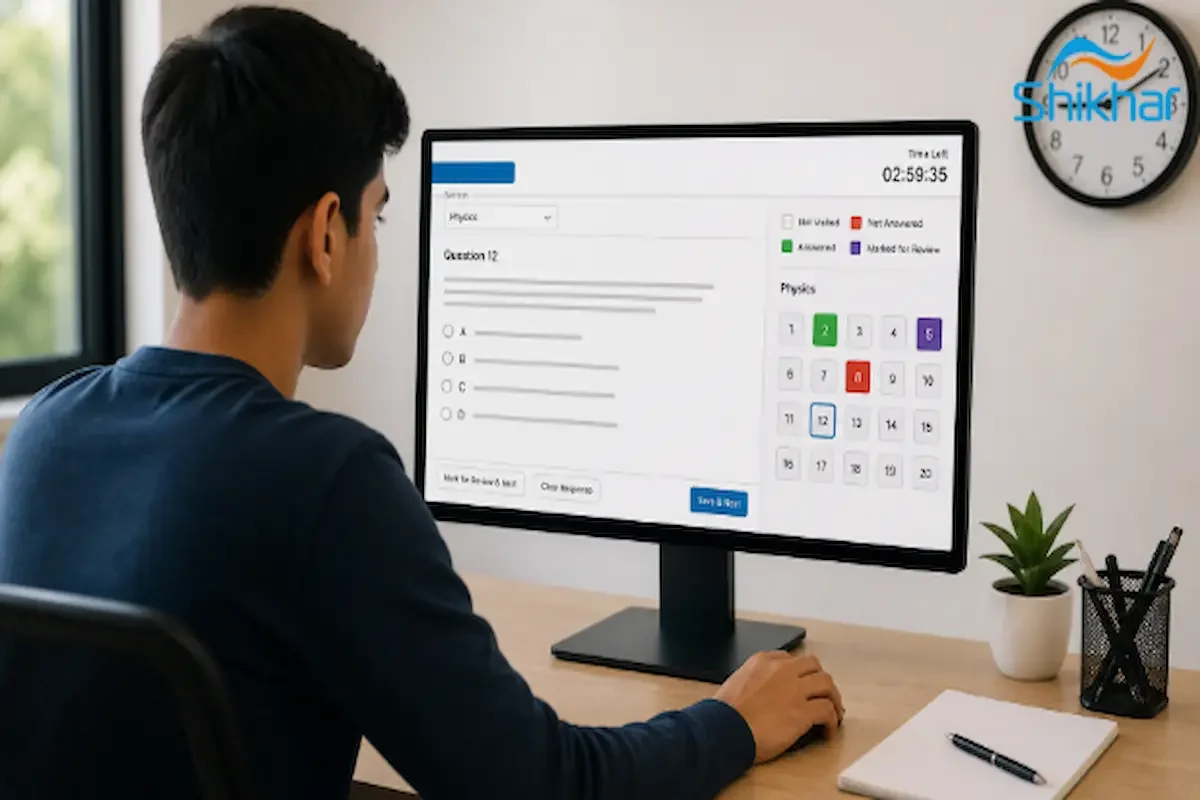
Navigate the exam screen with your mouse. The screen displays the question, the answer choices, an on-screen timer and a question palette. When a numerical-value question is selected, an on-screen numeric keypad is provided. The timer is active all the time, and the program will automatically submit at the end of the test time.
What appears on the exam screen?
The question number, question text, options, or a text box for entering a number, and the question palette are displayed on the right side of the screen. The question palette indicates question status. A calculator may be provided for numerical questions. The screen has navigation buttons at the bottom right, such as Save & Next, Clear Response, Mark for Review & Next and Submit. Read the instruction screen before the exam begins.
How do you navigate, save and submit answers?
1. Save & Next stores your answer at that step. Use it after you have selected an option or entered a value so that your answer is saved.
2. Clear Response deletes the selected option or value. If you're unsure, clear the response then try another.
3. Mark for Review & Next This feature flags a question as a place to return to later. Does not save your response as final, so use plus Save & Next when appropriate.
4. Save & Mark for Review saves your answer and marks the question. Use this if you are reasonably certain but might want to come back to this question later.
5. Submit will finish the exam on the summary page. Review your response list before submitting. Once submitted, all answers are unable to be modified.
What do the question palette colours mean?
JEE advanced computer based: how it differs
This is also computer based but organised by the IITs and with a different paper pattern. The format of the interface is similar in principle - you read the questions on-screen, write back your answers and navigate through the paper using some navigation keys. The main difference is the structure of the paper and the type of questions - but in essence, both are CBT. Practice with the mock interface for both exams to avoid surprises at the time.
Reporting time vs exam start time and the exam-day process
Reporting time will always be before the exam start time. Your admit card will mention the reporting time and shift. Reach the centre very much before that as door entry, identity verification and frisking take some time. Don't assume that the exam starts once you sit.
What is the step-by-step process at the centre?
1. Gate entry will start from the reporting time. Please keep your admit card and photograph ID in your possession.
2. ID check and security screening before entering the examination hall. Metal objects and / or banned items are screened.
3. Seating and login will follow. An invigilator will assist you with your login and you will then see the instruction screen.
4. Login, instructions, and exam start Continues after login. Follow instructions on your screen and use the navigation buttons designed like a glass.
5. No exit permitted until the end of the exam as per the centre regulations.
What to carry and what is not allowed
You must carry only those items as per the provisions in the admit card and NTA instructions. Rough sheets will be provided at the centre. Items like electronic devices, smart watches, jewellery, and metallic accessories are not permitted in the exam hall.
What should you carry to the CBT centre?
1. Admit card plus recent passport size photograph.
2. Photo ID bearing your name and photo like Aadhaar/ PAN/ passport etc as applicable.
3. Simple pen - if the centre permits for rough work; observe centre regulations.
4. If the present recommendation allows, use a see through water bottle.
Practise on a CBT-format mock before exam day
A mock test on a CBT-style screen is the closest experience to the actual exam without being physically at the centre. Shikhar Classes supports aspirants in practicing JEE computer based tests through timed mocks that mimic the exam interface, helping you understand where to click, when to save, and how to navigate the question palette. This familiarity helps reduce anxiety on exam day.
Why does a mock test matter?
The JEE computer based exam tests your speed and accuracy, not just knowledge. A mock guides you on how to save answers, go back and recheck questions and then submit before the timer runs out. It will also tell you if you are spending more time with the interface than with the question.
Final checklist for JEE computer based exam day
1. Refer confirm centre, reporting time and shift from the admit card.
2. Bring admit card and a valid photo ID.
3. Dress wearing plain clothing and avoide any accessories made of metal.
4. Be sure to use Save & Next and Mark for Review intentionally.
5. Review the summary screen and submit.
6. Practice a CBT-format mock test before the actual exam.
Once the interface doesn't feel new or confusing, the JEE computer based exam becomes manageable. Concern yourself with the process, practice getting around the screen and reach early on exam day. Shikhar Classes can help you prepare with CBT-style mock exams and advice.
FAQs
Can I use the on-screen calculator in JEE Main?
Usually, you can use a virtual calculator for numerical-value questions, though this can depend on the exam and session. Look at the instruction screen and try the mock.
What happens if the timer runs out during the CBT?
Your saved answers will automatically be submitted at the end of the allotted time. Your answers may not be saved if they are not answered, so use Save & Next frequently.
Is the NTA mock test the same as the real JEE computer based exam?
Pretending it's exam day practice test, it uses a similar interface and is the best practice route. It is not the actual exam but it makes you ready with navigation and the question palette.
Does JEE Advanced use the same CBT interface as JEE Main?
The essence of CBT is identical, but the combinations of simple paper pattern and question are not the same. Practise the official mock for each exam separately.